
Calculate Species Relative Occupancy Over Space or Time
Source:R/indicator_wrappers.R
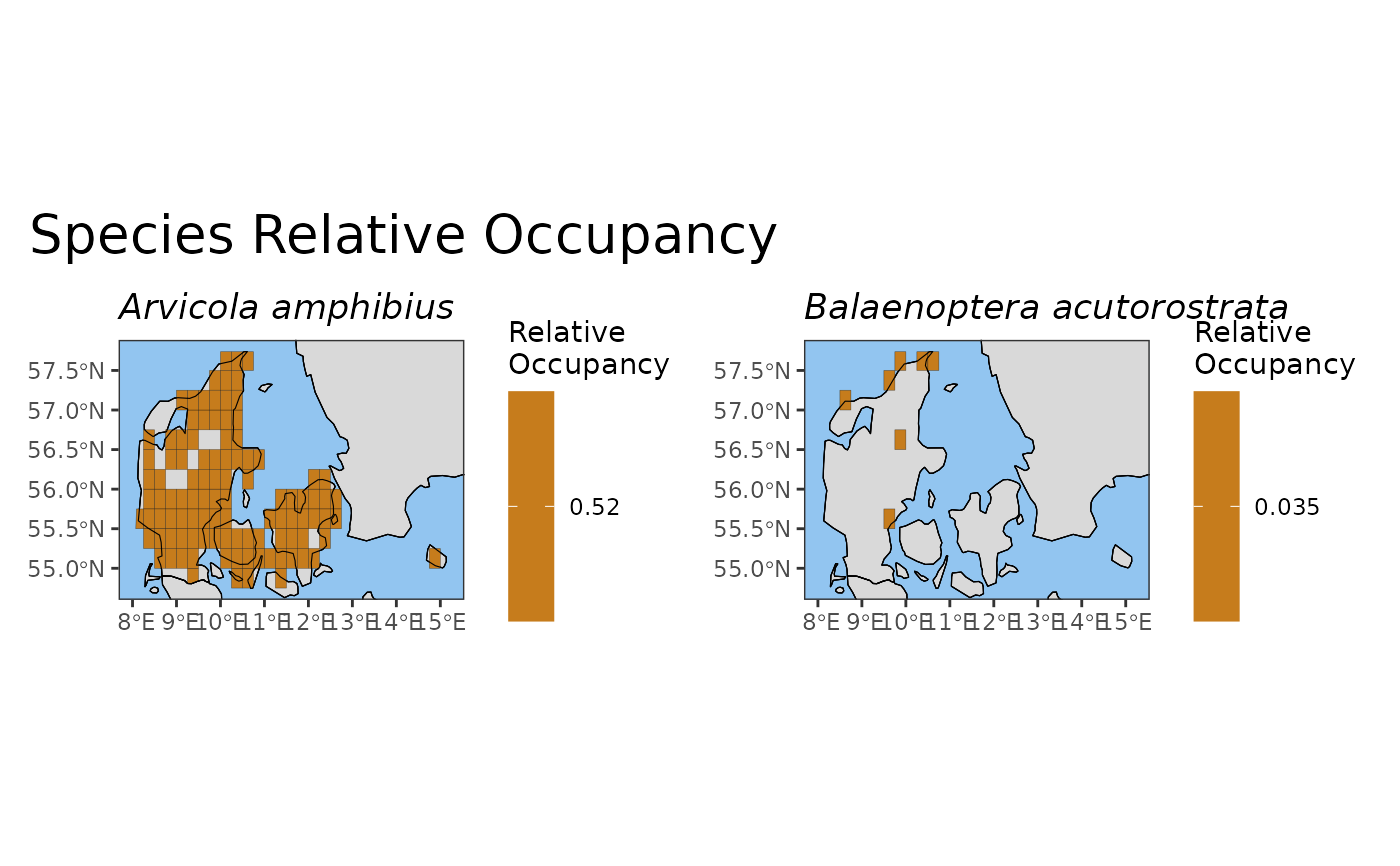
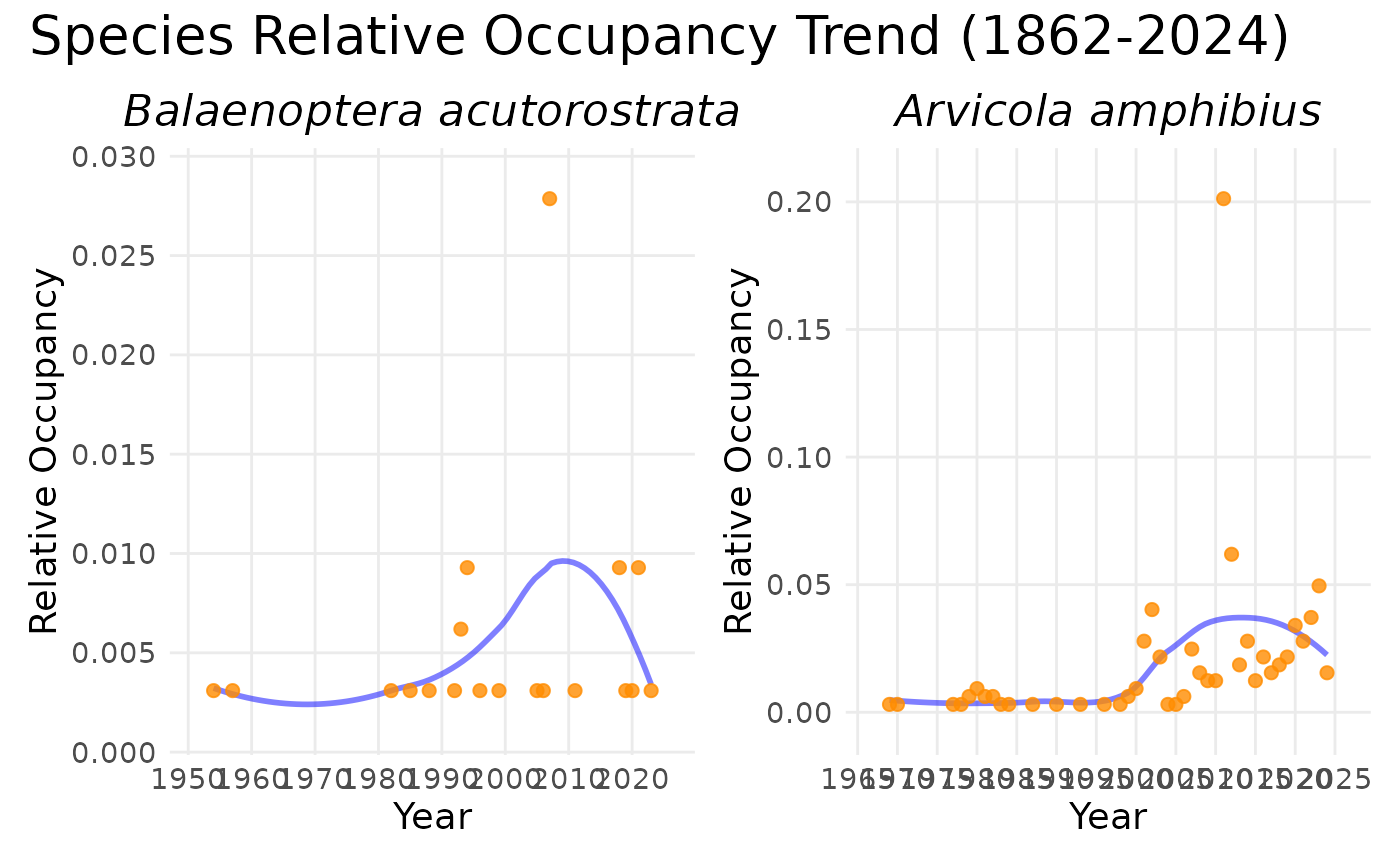
relative_occupancy_map.RdCalculate the relative occupancy of each species - the
proportion of grid cells in which it has been recorded - either as a
gridded map or as a time series. Three denominator definitions are
available via the occ_type parameter (see 'Details').
Usage
relative_occupancy_map(data, occ_type = 0, ...)

relative_occupancy_ts(data, occ_type = 0, ...)
Arguments
- data
A data cube object (class 'processed_cube').
- occ_type
Integer controlling the occupancy denominator. One of:
0(default) - Total-area occupancy: denominator is all grid cells in the study region (including those with no records).1- Ever-occupied occupancy: denominator is the number of cells with at least one occurrence (any species) anywhere in the time window.2- Annual occupancy: for time series, the denominator is the number of cells with at least one occurrence (any species) in that year; for maps, the per-year proportion is computed and then averaged across the years in which the species was recorded.
- ...
Arguments passed on to
compute_indicator_workflowcell_size(Optional) Length of grid cell sides, in km or degrees. Only used for maps and for time series that require a grid.
"grid"(default): use the native resolution of the cube. If this would produce more than about 1 million grid cells over the study area (for degree-based cubes: if the resolution is finer than 1 degree for 'world' or 'continent', or finer than 0.1 degrees otherwise), you are asked to confirm in an interactive session, and the function stops with an error in a non-interactive session."auto": determined automatically. For km-based grids it depends on the area of the study region: 100 km for areas of at least 1 million sq km, 10 km for at least 10,000 sq km, 1 km for at least 100 sq km, and 0.1 km for smaller areas. For degree-based grids it is 1 degree for 'world' or 'continent' and 0.1 degrees otherwise. The automatic size is never smaller than the cube's resolution.A number (in the units of the cube's resolution, i.e. km or degrees), or for km-based grids a string such as
"10km"or"500m".
A manually selected cell size must be a whole number multiple of the cube's resolution.
level(Optional) Spatial level: 'cube', 'continent', 'country', 'world', 'sovereignty', or 'geounit'. (Default: 'cube')
region(Optional) The region of interest (e.g., "Denmark"). Ignored if level is 'cube' or 'world'. (Default: "Europe")
ne_type(Optional) The type of Natural Earth data to download: 'countries', 'map_units', 'sovereignty', or 'tiny_countries'. This parameter is ignored if level is set to 'cube' or 'world'. (Default: "countries")
ne_scale(Optional) The scale of Natural Earth data to download: 'small' - 110m, 'medium' - 50m, or 'large' - 10m. (Default: "medium")
output_crs(Optional) The CRS you want for your calculated indicator. (Leave blank to let the function choose a default based on grid reference system.)
first_year(Optional) Exclude data before this year. (Uses all data in the cube by default.)
last_year(Optional) Exclude data after this year. (Uses all data in the cube by default.)
spherical_geometry(Optional) If set to FALSE, will temporarily disable spherical geometry while the function runs. Should only be used to solve specific issues. (Default is TRUE).
make_valid(Optional) Calls st_make_valid() from the sf package after creating the grid. Increases processing time but may help if you are getting polygon errors. (Default is FALSE).
shapefile_path(optional) Path of an external shapefile to merge into the workflow. For example, if you want to calculate your indicator for particular features such as protected areas or wetlands.
shapefile_crs(Optional) CRS of a .wkt shapefile. If your shapefile is .wkt and you do NOT use this parameter, the CRS will be assumed to be EPSG:4326 and the coordinates will be read in as lat/long. If your shape is NOT a .wkt the CRS will be determined automatically.
invert(optional) Calculate an indicator over the inverse of the shapefile (e.g. if you have a protected areas shapefile this would calculate an indicator over all non protected areas within your cube). Default is FALSE.
include_land(Optional) Include occurrences which fall within the land area. Default is TRUE. Note that this is purely a geographic filter, and does not filter based on whether the occurrence is actually terrestrial. Grid cells which fall partially on land and partially on ocean will be included even if include_land is FALSE. To exclude terrestrial and/or freshwater taxa, you must manually filter your data cube before calculating your indicator.
include_ocean(Optional) Include occurrences which fall outside the land area. Default is TRUE. Set as "buffered_coast" to include a set buffer size around the land area rather than the entire ocean area. Note that this is purely a geographic filter, and does not filter based on whether the occurrence is actually marine. Grid cells which fall partially on land and partially on ocean will be included even if include_ocean is FALSE. To exclude marine taxa, you must manually filter your data cube before calculating your indicator.
buffer_dist_km(Optional) The distance to buffer around the land if include_ocean is set to "buffered_coast". Default is 50 km.
force_grid(Optional) Forces the calculation of a grid even if this would not normally be part of the pipeline, i.e. for time series. A grid is needed for time series of area-based rarity, Hill diversity and relative occupancy (and for completeness with
gridded_average = TRUE). This is switched on automatically for these indicators: the wrappersarea_rarity_ts(),hill0_ts(),hill1_ts()andhill2_ts()already setforce_grid = TRUE, so do not pass it to them. (Default: FALSE)
Value
An S3 object with the classes 'indicator_map' or 'indicator_ts' and 'relative_occupancy' containing:
cellid (map) or year (ts): spatial or temporal identifier.
cellCode: grid cell codes (map only; if available).
taxonKey: GBIF taxon keys.
scientificName: Species scientific names.
diversity_val: Relative occupancy value in \([0, 1]\).
Details
Relative occupancy
Relative occupancy quantifies how widely distributed a species is within
a study region, expressed as a proportion (0-1). The numerator is always
the number of post-aggregation grid cells (cellid) in which the species
has at least one recorded occurrence. The denominator depends on
occ_type:
occ_type | Name | Denominator |
0 | Total-area | All grid cells in region (constant) |
1 | Ever-occupied | Cells with at least 1 occurrence, any species, full window |
2 | Annual (TS) / Temporal mean (map) | Cells with at least 1 occurrence in that year |
Type 0 is the most conservative and comparable across different data cubes because the denominator is fixed by the grid definition. A low value means the species occupies few cells relative to the entire region; however, empty cells cannot be assumed truly unoccupied - they may be under-sampled or simply not yet visited.
Type 1 restricts the denominator to cells where any occurrence was recorded across the full time window, conditioning on cells with documented sampling effort. Values will always be \(\geq\) the corresponding Type 0 value (since the denominator is smaller). Useful when you wish to compare species occupancy within the subset of cells that have been at least partially surveyed.
Type 2 further restricts the denominator within each year (for time series) to cells active in that year. For maps, the annual proportion is computed first and then averaged across the years in which the species was recorded (temporal mean). This is the most dynamic measure, as both numerator and denominator can vary per year, reflecting inter-annual changes in sampling footprint.
Presence-only data caveat
These cubes contain presence-only data. An empty cell does not imply that a species was absent - it may simply reflect lack of sampling in that cell. Types 1 and 2 partially address this by conditioning on cells where at least one occurrence was recorded, but those cells still only document where observers were active, not where species were definitively absent. All three types should be interpreted as recorded occupancy, not true occupancy.
Cell aggregation
When cell_size is coarser than the native cube resolution, the data are
first aggregated to the coarser grid (internally via
aggregate_data_to_coarser_grid()).
All denominators are computed on the post-aggregation cellid (not the
original cellCode). This ensures the indicator is consistent with the
resolution at which it is displayed.
Functions
relative_occupancy_map(): Calculate relative occupancy as a gridded map.relative_occupancy_ts(): Calculate relative occupancy as a time series.
References
Sax, D. F., & Gaines, S. D. (2003). Species diversity: from global decreases to local increases. Trends in Ecology & Evolution, 18(11), 561-566.
See also
Other species-based indicators:
spec_occ_map(),
spec_range_map()
Examples
# \donttest{
# Type 0: proportion of all grid cells
ro_map <- relative_occupancy_map(example_cube_1,
level = "country", region = "Denmark", occ_type = 0
)
plot(ro_map, c(2440728, 4265185))
 # Type 1: proportion of ever-occupied cells
ro_map_1 <- relative_occupancy_map(example_cube_1,
level = "country", region = "Denmark", occ_type = 1
)
# Type 2: temporal mean annual occupancy
ro_map_2 <- relative_occupancy_map(example_cube_1,
level = "country", region = "Denmark", occ_type = 2
)
# }
# \donttest{
# Type 0: proportion of all grid cells (default)
ro_ts <- relative_occupancy_ts(example_cube_1, occ_type = 0)
#> although coordinates are longitude/latitude, st_intersection assumes that they
#> are planar
plot(ro_ts, c(2440728, 4265185))
# Type 1: proportion of ever-occupied cells
ro_map_1 <- relative_occupancy_map(example_cube_1,
level = "country", region = "Denmark", occ_type = 1
)
# Type 2: temporal mean annual occupancy
ro_map_2 <- relative_occupancy_map(example_cube_1,
level = "country", region = "Denmark", occ_type = 2
)
# }
# \donttest{
# Type 0: proportion of all grid cells (default)
ro_ts <- relative_occupancy_ts(example_cube_1, occ_type = 0)
#> although coordinates are longitude/latitude, st_intersection assumes that they
#> are planar
plot(ro_ts, c(2440728, 4265185))
 # Type 1: proportion of ever-occupied cells (constant denominator)
ro_ts_1 <- relative_occupancy_ts(example_cube_1, occ_type = 1)
#> although coordinates are longitude/latitude, st_intersection assumes that they
#> are planar
# Type 2: proportion of cells active that year (varying denominator)
ro_ts_2 <- relative_occupancy_ts(example_cube_1, occ_type = 2)
#> although coordinates are longitude/latitude, st_intersection assumes that they
#> are planar
# }
# Type 1: proportion of ever-occupied cells (constant denominator)
ro_ts_1 <- relative_occupancy_ts(example_cube_1, occ_type = 1)
#> although coordinates are longitude/latitude, st_intersection assumes that they
#> are planar
# Type 2: proportion of cells active that year (varying denominator)
ro_ts_2 <- relative_occupancy_ts(example_cube_1, occ_type = 2)
#> although coordinates are longitude/latitude, st_intersection assumes that they
#> are planar
# }